AI Agent vs. AI Workflow: What Is the Difference?
AI agents and AI workflows solve different problems. Agents make autonomous decisions. Workflows orchestrate predictable multi-step processes. Here is when to use each.
The terms "AI agent" and "AI workflow" show up in every product announcement, pitch deck, and technical blog post. They are often used interchangeably, which causes real confusion when teams try to decide what to build.
They are not the same thing. They solve different problems, fail in different ways, and require different design decisions. Understanding the distinction matters because choosing the wrong pattern for your use case will cost you months of development time and produce a system that is either too rigid or too unpredictable.
What an AI agent actually is
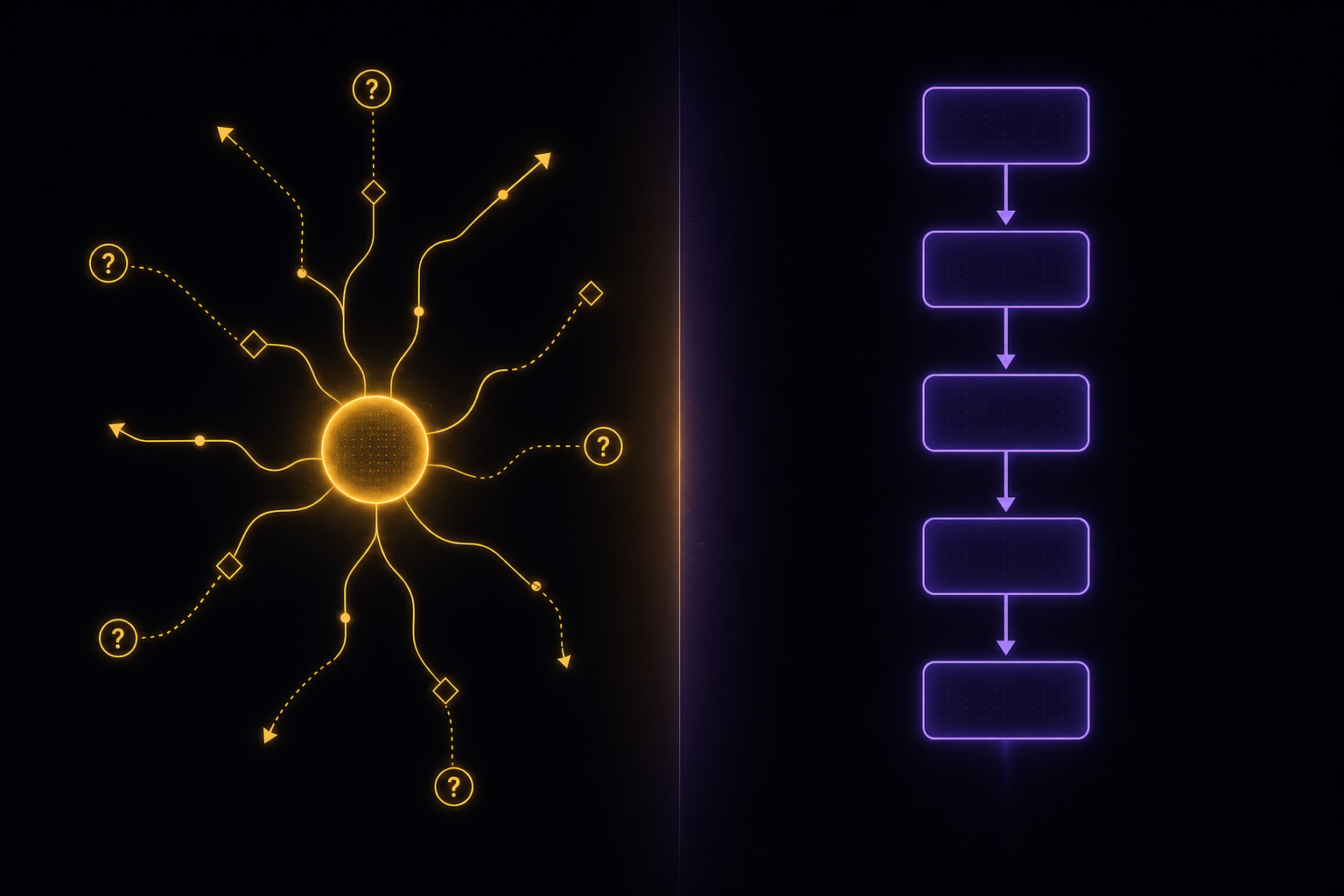
An AI agent is a system that receives a goal and decides how to achieve it. The key word is "decides." The agent chooses its own actions, evaluates the results, and adjusts its approach based on what it observes.
A simple example: you give an agent the goal "find the three cheapest flights from Montreal to London in March." The agent decides which flight search APIs to call, how to parse the results, whether to retry if a source is down, and how to rank and compare prices across different currencies and layover structures. You defined the goal. The agent figured out the steps.
This autonomy is what separates agents from everything else. An agent is not following a script. It is making decisions at runtime based on the current state of the world.
The tradeoff is predictability. Because the agent decides what to do, you cannot guarantee exactly what steps it will take, how long it will take, or how much it will cost. You can constrain it with guardrails, but you cannot fully predetermine its behavior. That is the point, and it is also the risk.
What an AI workflow actually is
An AI workflow is a predefined sequence of steps that processes data through multiple AI models and operations. The key word is "predefined." You design the steps, the order, the branching logic, and the error handling ahead of time. The workflow executes what you designed.
The same flight search as a workflow: Step 1 calls Skyscanner API. Step 2 calls Google Flights API. Step 3 normalizes the results into a common format. Step 4 filters by date range. Step 5 sorts by price. Step 6 returns the top three. Every execution follows the same path. If Skyscanner is down, the workflow follows the error handling you defined for that specific step (retry three times, then skip and continue with Google Flights data only).
Workflows are deterministic where agents are probabilistic. You know exactly what a workflow will do before it runs. You can predict cost, duration, and output format. You can test it exhaustively because the paths are finite and known.
The tradeoff is flexibility. If a new flight data source appears, you need to update the workflow definition. If the user asks a slightly different question ("cheapest flights with lounge access"), you need to have anticipated that variation in the design. A workflow cannot handle situations you did not plan for.
The confusion: why people mix them up
The confusion exists because modern AI systems often combine both patterns, and because marketing teams use "agent" to describe everything.
Here is what muddies the water:
LLM-powered steps inside workflows. A workflow might include a step that calls GPT-5 to classify customer intent. That step uses an LLM, which makes probabilistic decisions about classification. But the workflow itself is still deterministic: the classification step always happens at the same point, always receives the same input format, and the workflow branches based on predefined rules about the classification output. The LLM makes a micro-decision. The workflow makes no macro-decisions.
Agents that follow patterns. Most practical agents are not fully autonomous. They operate within a loop: observe, think, act, observe again. The loop structure is a workflow. But the decisions within each iteration are agentic. The agent decides which tool to call next, not the workflow designer.
The "agentic workflow" hybrid. This is where most production systems actually live. You design a workflow that orchestrates multiple steps, but some of those steps contain agents that make autonomous decisions within defined boundaries. The workflow provides structure. The agents provide flexibility where you need it.
When to use an agent
Agents are the right choice when:
The problem space is open-ended. Research tasks, data exploration, creative generation -- situations where you cannot enumerate all the possible paths ahead of time. An agent that researches a topic will follow different paths depending on what it finds, which is exactly the behavior you want.
The user's intent varies widely. A customer support system where users can ask anything from "where is my order" to "I want to return five items and exchange two others for different sizes and colors" benefits from an agent that can interpret intent and compose a response plan on the fly.
You need tool selection. When the system has access to multiple tools (APIs, databases, search engines, calculators) and needs to decide which ones to use based on the specific request, an agent handles this naturally. A workflow would require you to predefine which tools apply to which situations.
Exploration matters more than efficiency. Agents can discover solutions you did not anticipate. If you are building a system that needs to find creative approaches to problems, agent autonomy is a feature, not a bug.
When to use a workflow
Workflows are the right choice when:
The process is known and repeatable. Content production pipelines, data processing chains, media transcoding, batch operations -- situations where the steps are the same every time and you need consistency. A content pipeline that generates, edits, and publishes articles should produce consistent results every run, not creative variations.
Cost predictability matters. Every workflow execution follows the same path (or one of a known set of paths), so you can calculate cost per execution with precision. Agents can go down rabbit holes. Workflows cannot. If you are processing ten thousand items per day and need to budget accurately, use a workflow.
Compliance and auditability are required. When you need to prove exactly what the system did and why, a workflow gives you a deterministic execution trace. Agents make decisions that are difficult to explain after the fact, especially when those decisions involve LLM reasoning.
Multiple team members need to understand the system. A visual workflow is self-documenting. Anyone can look at the canvas and understand the process. An agent's decision-making is opaque by comparison. If your content team, QA team, and engineering team all need to understand and modify the system, a workflow is more accessible.
You need guaranteed completion. Workflows finish. They follow their defined path and terminate. Agents can loop indefinitely if their termination conditions are poorly defined. For production systems that need SLAs, workflows are safer.
The hybrid pattern that actually works
In practice, the most effective AI systems are neither pure agents nor pure workflows. They are workflows with agentic steps.
Here is what this looks like:
A content quality pipeline. The workflow is deterministic: ingest article, check grammar, evaluate readability, assess factual claims, generate SEO suggestions, produce final report. Most of these steps are straightforward AI model calls orchestrated in sequence. But the "assess factual claims" step is agentic: it needs to decide which claims to verify, choose appropriate sources, evaluate source reliability, and make a judgment call about accuracy. That one step gets agent autonomy. Everything else follows the workflow.
A customer onboarding system. The workflow handles the predictable parts: send welcome email, provision account, schedule demo call, trigger product tour. But the "personalize product tour" step is agentic: based on the customer's industry, company size, and stated goals, an agent selects which features to highlight, which examples to show, and which integrations to suggest. The agent makes micro-decisions within a macro-structure.
A multi-model media pipeline. The workflow defines the process: take input text, generate an image, create a voiceover, combine into video. Each model call is a workflow step with defined inputs and outputs. But model selection can be agentic: based on the content type (technical diagram vs. lifestyle photo vs. abstract illustration), an agent chooses which image model to use and what parameters to set. You get workflow predictability with agent flexibility at specific decision points.
How to decide for your use case
Ask these questions:
- **Can you draw the process on a whiteboard?** If yes, it is a workflow. If you find yourself writing "it depends" at multiple branch points, those branch points might need agents.
- **Do you need the same output format every time?** Workflows guarantee consistent output structure. Agents may produce variable output. If your downstream system expects a specific format, a workflow is safer.
- **What happens if the system makes a bad decision?** If a bad decision means sending a wrong email to a customer, you want a workflow with human review steps. If a bad decision means a slightly suboptimal research summary, an agent is fine.
- **How often does the process change?** If the steps change weekly, a visual workflow builder lets you iterate without redeploying code. If the steps are stable but the decisions within them need to adapt, embed agents inside a stable workflow.
- **What is your cost per execution?** Agents consume unpredictable amounts of tokens. A research agent might make three API calls or thirty, depending on the question. If you need to control costs tightly, workflows give you predictable per-execution pricing.
The bottom line
AI agents and AI workflows are not competing approaches. They are complementary tools that solve different parts of the same problem.
Use workflows for structure: defining what happens, in what order, with what data. Use agents for decisions: choosing how to handle situations that cannot be fully anticipated at design time.
The best AI systems use both. The workflow provides the skeleton. Agents provide intelligence at the joints.
If you are starting a new AI project today, begin with a workflow. Map out the process, define the steps, connect the models. Then identify the specific steps where you need flexibility and autonomy, and add agentic behavior there. You will end up with a system that is predictable where it needs to be, flexible where it matters, and maintainable by your entire team.
Related
What Is Agentic Orchestration?
Agentic orchestration lets AI agents coordinate, reason, and act across multiple models and tools. Learn how it works and why it matters.
6 min read
Why No-Code Matters for AI Agents
Visual AI workflow builders are not about replacing engineers. They are about letting the whole team participate in building AI systems that actually ship.
5 min read